Indexes in MySQL are an excellent tool for optimizing SQL queries. To understand how they work, let’s look at working with data without them.
1. Reading data from disk
On a hard disk there is no such concept as a “file” at the low level — there are blocks. One file usually occupies several blocks. Each block knows which block comes next. The file is split into chunks, and each chunk is stored in an empty block.
When reading a file, we walk through all blocks in order and assemble the file from chunks. Blocks of one file can be scattered across the disk (fragmentation). Then reading slows down because the drive has to jump between different areas.
When we search for something inside a file, we have to walk through all blocks where it is stored. If the file is very large, there will be many blocks. Jumping between blocks in different places slows the search down a lot.
2. Searching data in MySQL
MySQL tables are regular files. Consider a query like this:
SELECT * FROM users WHERE age = 29
MySQL opens the file that stores the users table data, then scans the whole file to find matching rows.
It also compares the value in every table row with the value in the query. Suppose the table has 10 rows. MySQL reads all 10, compares each age value with 29, and keeps only the matches.
So there are two problems when reading data:
- Slow file reads because blocks are scattered across the disk (fragmentation)
- A large number of comparisons to find the needed data
3. Sorting data
Imagine we sorted those 10 rows. Then, using a binary search, we could find the needed values in at most 4 operations:
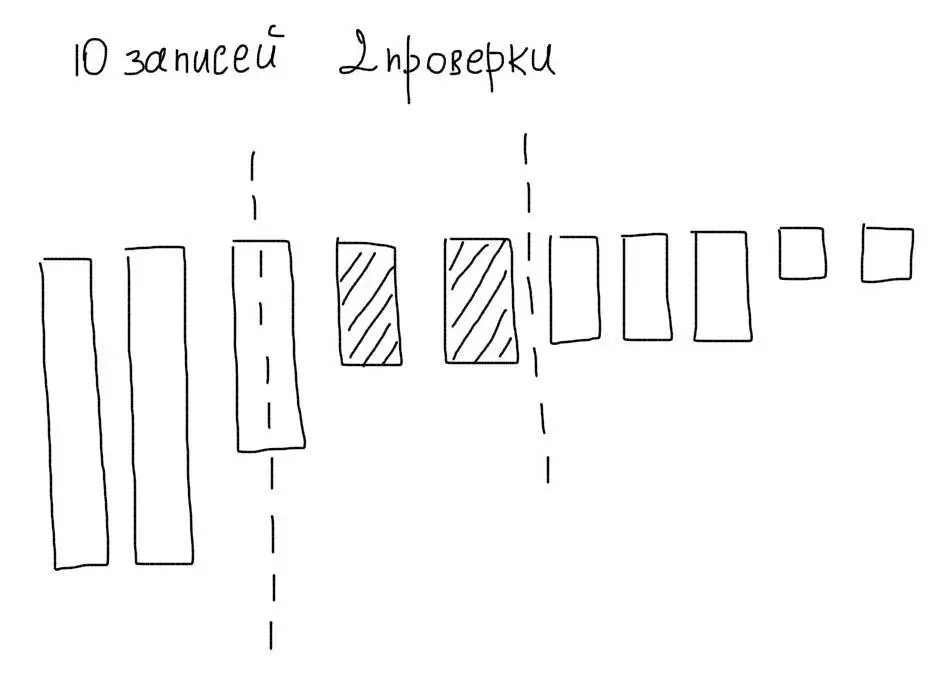
Besides fewer comparisons, we would also avoid reading unnecessary rows.
An index is a sorted set of values. In MySQL, indexes are always built for a specific column. For example, we could build an index on the age column from the example above.
4. Choosing indexes in MySQL
In the simplest case, create an index on columns that appear in the WHERE clause.
For the example query:
SELECT * FROM users WHERE age = 29
create an index on age:
CREATE INDEX age ON users(age);
After that, MySQL will use the age index for such queries. The same index will also be used for range lookups:
SELECT * FROM users WHERE age < 29
Sorting
For queries like:
SELECT * FROM users ORDER BY register_date
the same rule applies — create an index on the column used for sorting:
CREATE INDEX register_date ON users(register_date);
How indexes are stored
Suppose the table looks like this:
| id | name | age |
|---|---|---|
| 1 | Den | 29 |
| 2 | Alyona | 15 |
| 3 | Putin | 89 |
| 4 | Petro | 12 |
After creating an index on age, MySQL stores those values sorted:
age index
12
15
29
89
It also stores the link between each index value and the matching row. Usually the primary key is used for that:
age index and row links
12: 4
15: 2
29: 1
89: 3
Unique indexes
MySQL supports unique indexes. They are useful for columns whose values must be unique across the table. Such indexes also make lookups for unique values more efficient. For example:
SELECT * FROM users WHERE email = 'golotyuk@gmail.com';
Create a unique index on email:
CREATE UNIQUE INDEX email ON users(email);
Then, when searching, MySQL can stop after the first match. With a regular index it still has to check the next value in the index.
5. Composite indexes
MySQL can use only one index per query (except when it can merge results from multiple indexes). So for queries that use several columns, you need composite indexes.
Consider this query:
SELECT * FROM users WHERE age = 29 AND gender = 'male'
Create a composite index on both columns:
CREATE INDEX age_gender ON users(age, gender);
How a composite index works
To use composite indexes correctly, understand their storage structure. It works like a regular index, but values combine all included columns. For a table like this:
| id | name | age | gender |
|---|---|---|---|
| 1 | Den | 29 | male |
| 2 | Alyona | 15 | female |
| 3 | Putin | 89 | tsar |
| 4 | Petro | 12 | male |
the composite index values look like:
age_gender
12male
15female
29male
89tsar
That means column order in the index matters a lot. Columns used in WHERE usually go first; columns from ORDER BY go last.
Range search
Suppose the query uses a range instead of equality:
SELECT * FROM users WHERE age <= 29 AND gender = 'male'
MySQL cannot use the full index, because gender values differ across different age values. In that case the database may use only part of the index (age):
age_gender
12male
15female
29male
89tsar
First it filters rows matching age <= 29. Then the "male" filter is applied without using the index.
Sorting
Composite indexes can also help with sorting:
SELECT * FROM users WHERE gender = 'male' ORDER BY age
Here you need a different column order, because sorting (ORDER BY) happens after filtering (WHERE):
CREATE INDEX gender_age ON users(gender, age);
That order lets MySQL filter by the first part of the index, then sort by the second.
You can include more columns if needed:
SELECT * FROM users WHERE gender = 'male' AND country = 'UA' ORDER BY age, register_time
Create this index:
CREATE INDEX gender_country_age_register ON users(gender, country, age, register_time);
6. Using EXPLAIN to analyze indexes
EXPLAIN shows how indexes are used for a specific query. For example:
mysql> EXPLAIN SELECT * FROM users WHERE email = 'golotyuk@gmail.com';
+----+-------------+-------+------+---------------+------+---------+------+------+-------------+
| id | select_type | table | type | possible_keys | key  | key_len | ref  | rows | Extra       |
+----+-------------+-------+------+---------------+------+---------+------+------+-------------+
|  1 | SIMPLE      | users | ALL  | NULL          | NULL | NULL    | NULL |  336 | Using where |
+----+-------------+-------+------+---------------+------+---------+------+------+-------------+
The key column shows the index in use. possible_keys shows all indexes that could be used. rows shows how many rows the database had to read (the table has 336 rows total).
In this example, no index is used. After creating an index:
mysql> EXPLAIN SELECT * FROM users WHERE email = 'golotyuk@gmail.com';
+----+-------------+-------+-------+---------------+-------+---------+-------+------+-------+
| id | select_type | table | type  | possible_keys | key   | key_len | ref   | rows | Extra |
+----+-------------+-------+-------+---------------+-------+---------+-------+------+-------+
|  1 | SIMPLE      | users | const | email         | email | 386     | const |    1 |       |
+----+-------------+-------+-------+---------------+-------+---------+-------+------+-------+
Only one row was read because the index was used.
Checking composite index length
EXPLAIN also helps verify whether a composite index is used correctly. Check the earlier query (with an index on age and gender):
mysql> EXPLAIN SELECT * FROM users WHERE age = 29 AND gender = 'male';
+----+-------------+--------+------+---------------+------------+---------+-------------+------+-------------+
| id | select_type | table  | type | possible_keys | key        | key_len | ref         | rows | Extra       |
+----+-------------+--------+------+---------------+------------+---------+-------------+------+-------------+
|  1 | SIMPLE      | users  | ref  | age_gender    | age_gender | 24      | const,const |    1 | Using where |
+----+-------------+--------+------+---------------+------------+---------+-------------+------+-------------+
key_len shows the used index length. Here, 24 bytes is the full index length (5 bytes for age + 19 bytes for gender).
If equality becomes a range search, MySQL may use only part of the index:
mysql> EXPLAIN SELECT * FROM users WHERE age <= 29 AND gender = 'male';
+----+-------------+--------+------+---------------+------------+---------+------+------+-------------+
| id | select_type | table  | type | possible_keys | key        | key_len | ref  | rows | Extra       |
+----+-------------+--------+------+---------------+------------+---------+------+------+-------------+
|  1 | SIMPLE      | users  | ref  | age_gender    | age_gender | 5       |      |   82 | Using where |
+----+-------------+--------+------+---------------+------------+---------+------+------+-------------+
That is a signal the index does not fit this query well. With a better index:
mysql> CREATE INDEX gender_age ON users(gender, age);
mysql> EXPLAIN SELECT * FROM users WHERE age < 29 AND gender = 'male';
+----+-------------+--------+-------+-----------------------+------------+---------+------+------+-------------+
| id | select_type | table  | type  | possible_keys         | key        | key_len | ref  | rows | Extra       |
+----+-------------+--------+-------+-----------------------+------------+---------+------+------+-------------+
|  1 | SIMPLE      | users  | range | age_gender,gender_age | gender_age | 24      | NULL |   47 | Using where |
+----+-------------+--------+-------+-----------------------+------------+---------+------+------+-------------+
Here MySQL uses the full gender_age index because the column order allows that lookup.
7. Index selectivity
Back to this query:
SELECT * FROM users WHERE age = 29 AND gender = 'male'
You need a composite index, but which column order?
age, gendergender, age
Both can work, but with different efficiency.
Look at value uniqueness and how many rows share each value:
mysql> SELECT age, COUNT(*) FROM users GROUP BY age;
+------+----------+
| age  | count(*) |
+------+----------+
|   15 |      160 |
|   16 |      250 |
|        ...      |
|   76 |      210 |
|   85 |      230 |
+------+----------+
68 rows in set (0.00 sec)

mysql> SELECT gender, COUNT(*) FROM users GROUP BY gender;
+--------+----------+
| gender | count(*) |
+--------+----------+
| female |     8740 |
| male   |     4500 |
+--------+----------+
2 rows in set (0.00 sec)
This tells us:
- Any given
agevalue usually matches about 200 rows - Any given
gendervalue matches about 6,000 rows
If age comes first, MySQL narrows the set to about 200 rows after the first index part. If gender comes first, it narrows only to about 6,000 — an order of magnitude more.
So age_gender will usually work better than gender_age.
Selectivity is determined by how many rows share the same value. When few rows share a value, selectivity is high. Put those columns first in composite indexes.
8. Primary keys
A primary key is a special index that identifies rows in a table. It must be unique and is defined when creating the table:
CREATE TABLE `users` (
  `id` int(10) unsigned NOT NULL AUTO_INCREMENT,
  `email` varchar(128) NOT NULL,
  `name` varchar(128) NOT NULL,
  PRIMARY KEY (`id`)
) ENGINE=InnoDB AUTO_INCREMENT=1 DEFAULT CHARSET=utf8;
With InnoDB tables, always define a primary key. If there is none, MySQL still creates a hidden virtual one.
Clustered indexes
Regular indexes are non-clustered. That means the index stores only references to table rows. When using the index, MySQL first gets a list of matching rows (their primary keys), then does another lookup to fetch row data.
Clustered indexes store full row data, not just references. No extra read is needed to fetch the row.
InnoDB primary keys are clustered, so lookups by primary key are very efficient.
Overhead
Remember that indexes add extra disk writes. Every update or insert also updates the index.
Create only the indexes you need, so you do not waste server resources. Check index sizes for your tables:
SHOW TABLE STATUS;
+-------------------+--------+---------+------------+--------+----------------+-------------+-----------------+--------------+-----------+----------------+---------------------+-------------+------------+-----------------+----------+----------------+---------+
| Name              | Engine | Version | Row_format | Rows   | Avg_row_length | Data_length | Max_data_length | Index_length | Data_free | Auto_increment | Create_time         | Update_time | Check_time | Collation       | Checksum | Create_options | Comment |
+-------------------+--------+---------+------------+--------+----------------+-------------+-----------------+--------------+-----------+----------------+---------------------+-------------+------------+-----------------+----------+----------------+---------+
...
| users             | InnoDB |      10 | Compact    |    314 |            208 |       65536 |               0 |        16384 |         0 |            355 | 2014-07-11 01:12:17 | NULL        | NULL       | utf8_general_ci |     NULL |                |         |
+-------------------+--------+---------+------------+--------+----------------+-------------+-----------------+--------------+-----------+----------------+---------------------+-------------+------------+-----------------+----------+----------------+---------+
When to create indexes
- Create indexes as you discover slow queries. MySQL’s slow query log helps. Queries taking more than 1 second are the first candidates for optimization.
- Start with the most frequent queries. A 1-second query that runs 1,000 times a day hurts more than a 10-second query that runs a few times a day.
- Do not create indexes on tables with fewer than a few thousand rows. The benefit is usually negligible at that size.
- Do not create indexes ahead of time in development. Indexes should match the shape and type of production load.
- Remove unused indexes.
The most important part
Spend enough time analyzing and organizing indexes in MySQL (and other databases). It can take more time than designing the schema itself. A good approach is a test environment with a copy of real data, where you can try different index structures.
Do not create an index on every column that appears in a query — MySQL does not work that way. Use unique indexes where needed. Always set primary keys.